Can’t attend an upcoming meeting? Here are some quick and simple ways for participants to decline a Coresee meeting invitation.
Once you log into your Coresee account, you'll arrive at the Homepage, where you can view a list of your rooms. You can only decline rooms you're invited to.
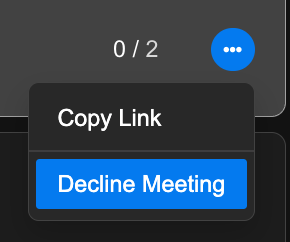
- From your Homepage, locate a room card you would like to decline and click its menu button.
- From the dropdown, select Decline Meeting.
- A dialogue box will appear confirming if you'd like to decline the meeting. Click Decline to move forward or select Cancel to keep the meeting.
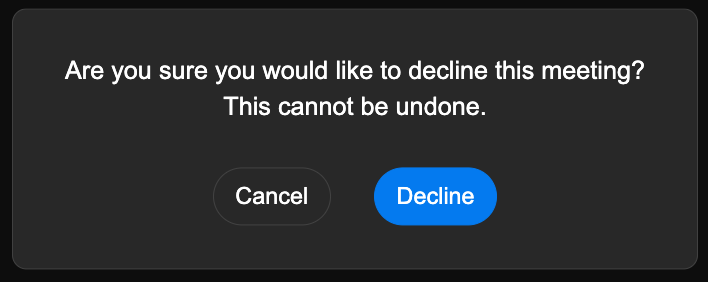
This will not delete the room, only remove you from the particip
Decline a Meeting from a Calendar Plugin
Google Calendar
- Starting from your Google Calendar, navigate to and open the meeting invitation you would like to decline.
- Next, locate the prompt 'Going?', and select No.
Microsoft Outlook
- Starting from your Microsoft Outlook Calendar, navigate to and open the meeting invitation you would like to decline.
- Next, towards the bottom of the invitation, select Decline.
Need additional support?
Our support team is available to assist you with any questions or concerns you may have. Feel free to reach out by emailing us at help@coresee.com
Was this article helpful?
That’s Great!
Thank you for your feedback
Sorry! We couldn't be helpful
Thank you for your feedback
Feedback sent
We appreciate your effort and will try to fix the article