Coresee can natively present a defined set of file formats directly inside a room — no screen share required. Files outside this set can be uploaded and stored, but cannot be presented to participants.
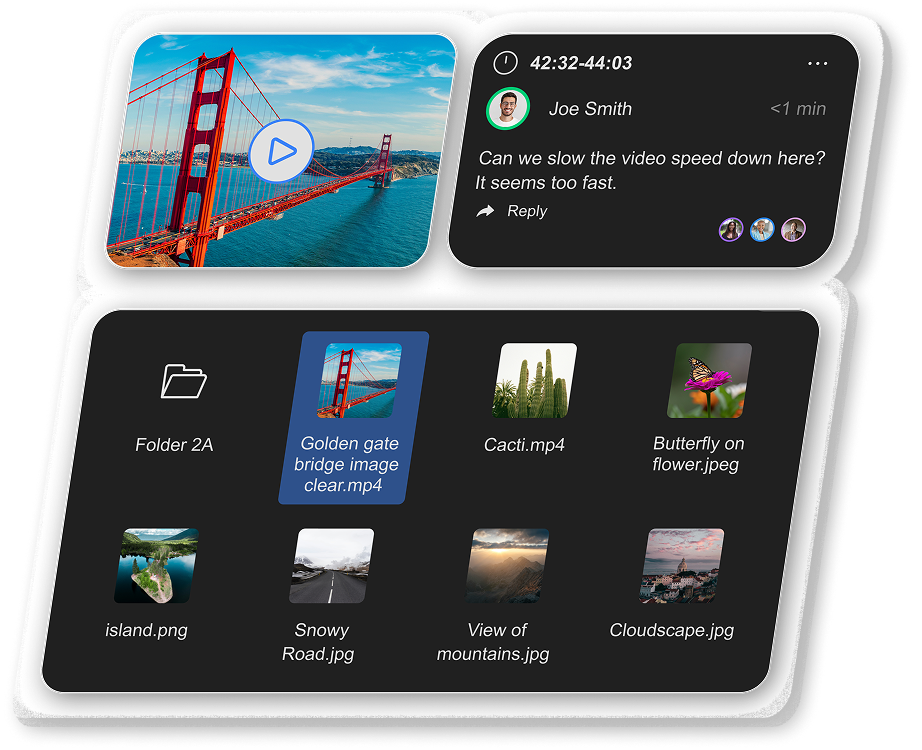
Supported formats for presentation
.mp4
.mov
.pdf
.jpeg
.png
.svg
.webp
.mp3
Unsupported Formats
The following formats cannot be presented natively in a Coresee room. Files in these formats can still be uploaded to the Files tab and downloaded by participants, but they will not load in the room presenter.
How to identify an unsupported file
You don't need to check the format manually. Coresee surfaces two clear indicators:
- Warning on the thumbnail — unsupported files display a warning indicator directly on their thumbnail in the Files tab, visible before you attempt to present.
- Present button greyed out — when you open the file's context menu, the Present option is disabled and cannot be selected.
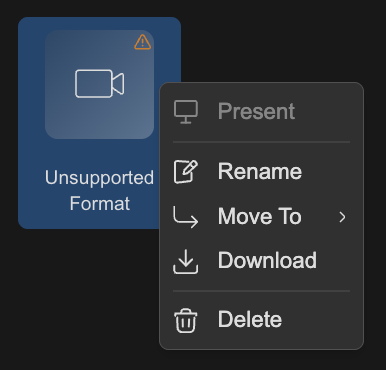
Examples of unsupported file types for presentation
.docx
.pptx
.mkv
.csv
.xlsx
Need additional support?
Our support team is available to assist you with any questions or concerns you may have. Feel free to reach out by emailing us at help@coresee.com
Was this article helpful?
That’s Great!
Thank you for your feedback
Sorry! We couldn't be helpful
Thank you for your feedback
Feedback sent
We appreciate your effort and will try to fix the article